INFO
This article was auto-translated using ChatGPT.
In the past few days, I needed to use VSCode for some tasks. When I was using Neovim, I got used to using telescope to search through code and files. After switching to VSCode, I wanted to keep that habit. So I decided to implement a similar feature inside VSCode — and that became a new VSCode extension I named fzfSearch!
Let's look at it first:
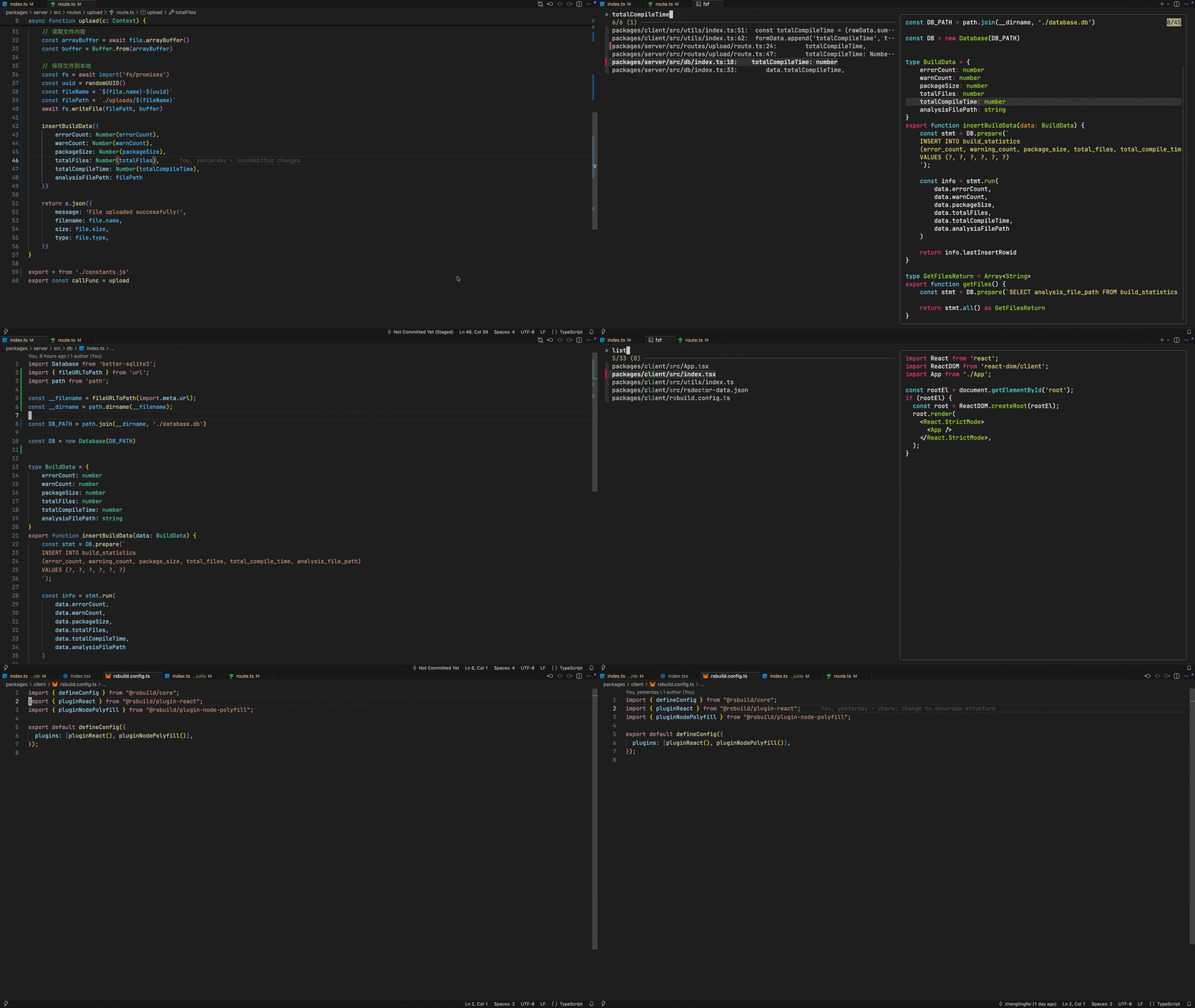
The core idea is to open a terminal inside VSCode and use fzf to perform searches. bat is used to render the preview window, and for content searching, ripgrep is used.
With these components, searching becomes straightforward. Below are the scripts used by fzf for filename search and content search:
const KEYMAPPING =
  '--bind "ctrl-d:preview-half-page-down,ctrl-u:preview-half-page-up,esc:become:"';
const LAYOUT = "--layout=reverse";

export const SEARCH_FILE_CMD = (chooseFilePaths: string) => {
  return `
fzf \
--preview "bat --color=always --plain {}" \
${LAYOUT} \
${KEYMAPPING} \
--multi > "${chooseFilePaths}"`;
};

export const SEARCH_CONTENT_CMD = (chooseFilePaths: string) => {
  return `
fzf --phony --query "" ${LAYOUT} \
--preview "bat --color=always --plain --highlight-line {2} {1} 2>/dev/null || true" \
--delimiter ':' \
--preview-window "+{2}-10" \
--bind "change:reload:(rg -n {q} || true)" \
${KEYMAPPING} \
--multi > "${chooseFilePaths}"`;
};
The keybindings inside fzf use ctrl-d and ctrl-u to scroll the preview window up and down for easier browsing.
Finally, the extension provides the following shortcuts for quick searching:
| Shortcut | Description |
|---|---|
ctrl-j | Move selection up |
ctrl-k | Move selection down |
tab | Multi-select files |
enter | Open file (opens the current cursor file if nothing is selected) |
ctrl-d | Scroll preview down |
ctrl-u | Scroll preview up |
Additional suggestion: Using it with VSCode Neovim will make the experience even smoother~
Configuration as follows:
nnoremap <silent> <leader>ff :<C-u>call VSCodeNotify('fzfsearch.search.file.toggle')<CR>
nnoremap <silent> <leader>fw :<C-u>call VSCodeNotify('fzfsearch.search.content.toggle')<CR>
nnoremap <silent> <leader>fg :<C-u>call VSCodeNotify('fzfsearch.search.repo.toggle')<CR>
That's pretty much it — hope you like it!