INFO
This article was auto-translated using ChatGPT.
The origin of this started with this tweet, which showed two different browser windows open, displaying two particle spheres. Then the author brought the two particle spheres close together, and a magical phenomenon occurred: the particles in the two spheres attracted each other, forming a connection between them. This effect, breaking the fourth wall, is truly amazing.
So I decided to implement one. After browsing more related tweets, I roughly understood the technology and principles involved. Now, let's get started with the implementation!
First, let's implement a draggable Div. For convenience, I'm directly using useDraggable from Vueuse, which allows for quick implementation of a draggable Div.
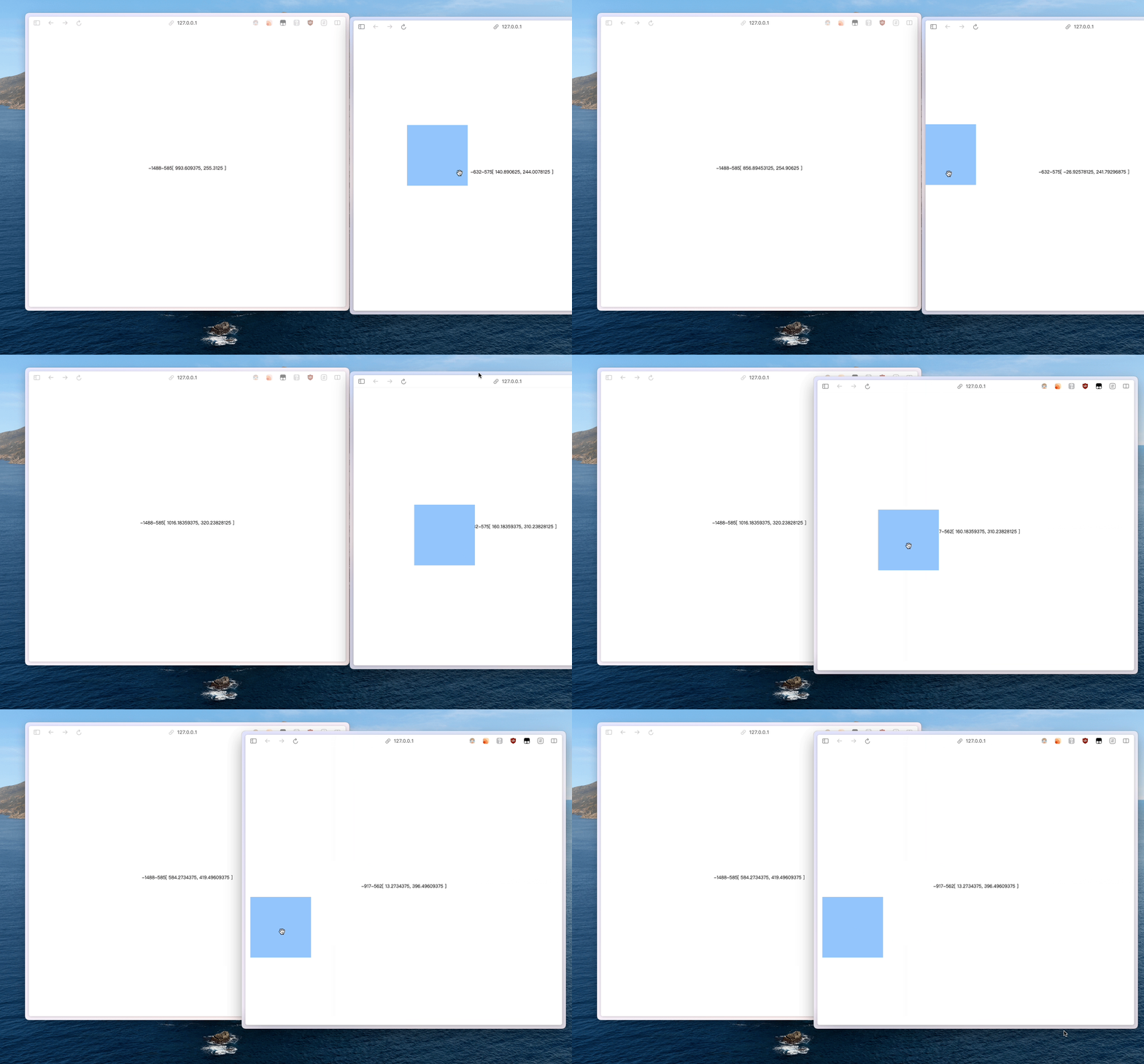
After making the Div draggable, the next step is to make it draggable across windows. To achieve cross-window dragging, it essentially involves updating and synchronizing the position information of a Div from one window to another. We could use localStorage for this, but it requires frequent reads and writes, which is a bit troublesome. This is where modern browser APIs for cross-window communication come in handy, specifically BroadcastChannel. Through it, we can achieve cross-window communication, as shown in the example below:
// Create an instance of BroadcastChannel and provide a channel name for subsequent subscriptions
const bc = new BroadcastChannel("crosswindow");

// Use postMessage to broadcast
bc.postMessage("Hello World");

// Bind the onmessage event to get broadcast event information
bc.onmessage = (ev) => {
  console.log(ev.data);
};
Now that the cross-window communication issue is resolved, let's dive into the code:
<script setup>
import { onDeactivated, onMounted, ref, watch } from "vue";
import { useDraggable } from "@vueuse/core";

const bc = new BroadcastChannel("crosswindow");

const oldX = ref(window.screenX);
const oldY = ref(window.screenY);
const el = ref();
const { x, y, style } = useDraggable(el, {
  initialValue: { x: 40, y: 40 },
});

let interval = null;

onMounted(() => {
  interval = setInterval(function () {
    oldX.value = window.screenX;
    oldY.value = window.screenY;
  }, 500);
});

onDeactivated(() => {
  clearInterval(interval);
});

watch([x, y], (value) => {
  // calculate the absolute position relative to the entire screen
  const newValue = [oldX.value + value[0], oldY.value + value[1]];

  bc.postMessage(newValue);
});

bc.onmessage = (ev) => {
  const [passX, passY] = ev.data;

  // calculate the relative position within the current window
  x.value = passX - oldX.value;
  y.value = passY - oldY.value;
};
</script>

<template>
  <div
    class="h-screen w-screen flex justify-center items-center select-none overflow-hidden"
  >
    <span>{{ oldX }}</span>
    <span>{{ oldY }}</span>
    <span>[{{ x }}, {{ y }}]</span>
  </div>
  <div
    class="h-40 w-40 bg-blue-300 fixed cursor-grab"
    ref="el"
    :style="style"
  ></div>
</template>
Up to this point, we have achieved cross-window dragging of a Div. For a more realistic effect, you can use window.getScreenDetails() to get the size of the current display and calculate whether the windows are adjacent or overlapping.
Check out the source code, and experience the Demo