INFO
This article was auto-translated using ChatGPT.
After nearly a month, the project development has finally concluded. This was my first experience developing in a team setting with a relatively standardized industrial process. During development, I encountered many problems and also solved many. These problems and their solutions will be valuable experience for future development, so I intend to share them here, hoping they can be helpful to you 🤝.
Pre-Project Discussion
Before starting a project, team members need to have a detailed discussion. This discussion helps team members gain a clearer and more unified understanding of the project, which will effectively reduce conflicts among team members during subsequent development.
Discussion topics include, but are not limited to, the following:
- What functionalities need to be implemented?
- What kind of UI style?
- Which components and frameworks to use?
- ......
UI Design
Before starting to write project code, the project's UI interface should be designed first, including various displays, interactions, and animations on the interface. Figma is recommended as the UI interface design tool.
UI interface design should be handled by team members with a higher aesthetic sense and some understanding of implementation methods. After all, neither you nor I want to see UI designers constantly arguing with code implementers. Of course, when designing the interface, remember to include the team members responsible for implementation to collectively discuss whether it can be achieved and if any compromises need to be made. You can never underestimate the wild imagination of UI designers.
After the interface design is complete, all team members need to repeatedly practice various operation flows on the interface, identify any unreasonable or inappropriate elements, and make modifications. Repeat these steps until a satisfactory interface is achieved.
Once a satisfactory interface is obtained, the implementing team members need to analyze the interface, extract repetitive elements, and analyze the data used, operational implementations, and animation implementations. These contents will need to be written as components in subsequent development!
Writing Code
To do good work, one must first sharpen one's tools.
Before starting to write code, we need to use a version control system for code version management to enable agile development and bug traceability. At the same time, we also need a remote code hosting platform to facilitate code synchronization and testing among team members.
For version control, git can be chosen.
There are many options for remote code hosting platforms. You can use Gitee or GitHub, or choose to set up your own GitLab. Self-hosting is highly recommended, but if you find it too troublesome, you can choose GitHub, though you might occasionally experience connectivity issues. Of course, there are ways to solve this 🪜. Unless absolutely necessary, it's best not to choose Gitee, as we both know why.
After selecting the tools, the development process needs to be designed. Here, I'll use an example of two developers and one tester.
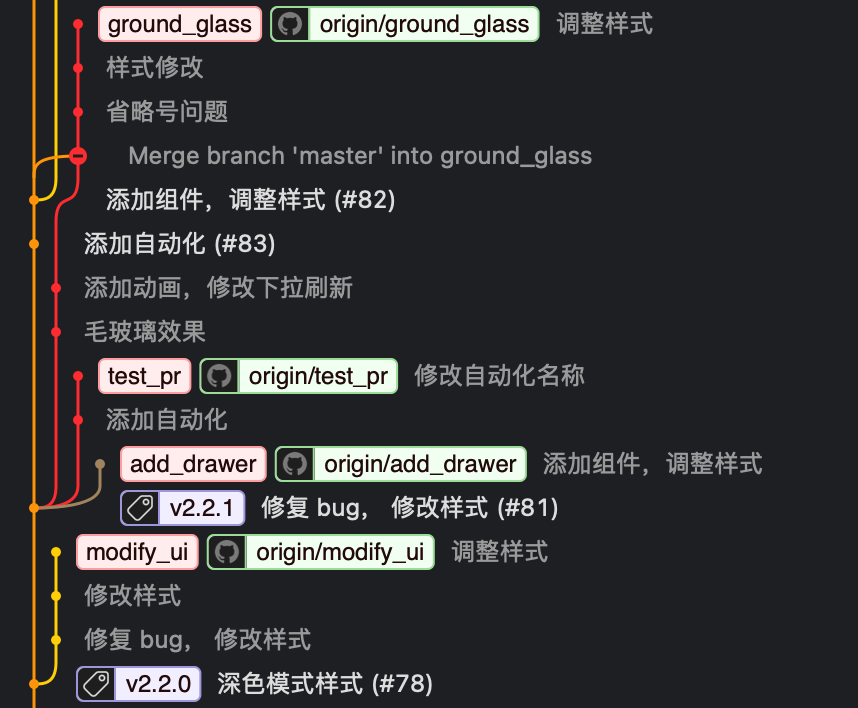
When starting development on a new feature, a developer needs to create a new branch from the main branch and name it appropriately. After creating the branch, code writing can begin. Once completed, it can be pushed to the remote code hosting platform and a PR submitted for testing. After submitting the PR, the developer can switch or create new branches to work on other new features. The tester needs to pull the PR to test it and then provide bug feedback. Upon receiving bug feedback, the developer needs to switch to the branch corresponding to that bug to fix it. After fixing, the code is pushed to the remote repository for testing again. This cycle repeats until the test results are satisfactory, after which the tester can merge the code into the main branch.
Sometimes, a feature requires two developers to complete simultaneously, such as one developer handling page styling and another handling page logic. In this case, the developer responsible for page styling needs to first create a branch, complete the page styling, then commit it to the remote code hosting platform and submit a draft PR. The developer responsible for logic pulls the code from the remote code hosting platform and continues to refine the logic code on the same branch. Once both developers have completed the feature, the PR can be activated for testing. The aforementioned process is repeated until it can be merged.
Documentation Writing
Usually, when writing documentation, multiple people need to collaborate, as code is not written by one person and there are different divisions of labor.
Notion greatly solves the need for multiple people to collaboratively write documentation.
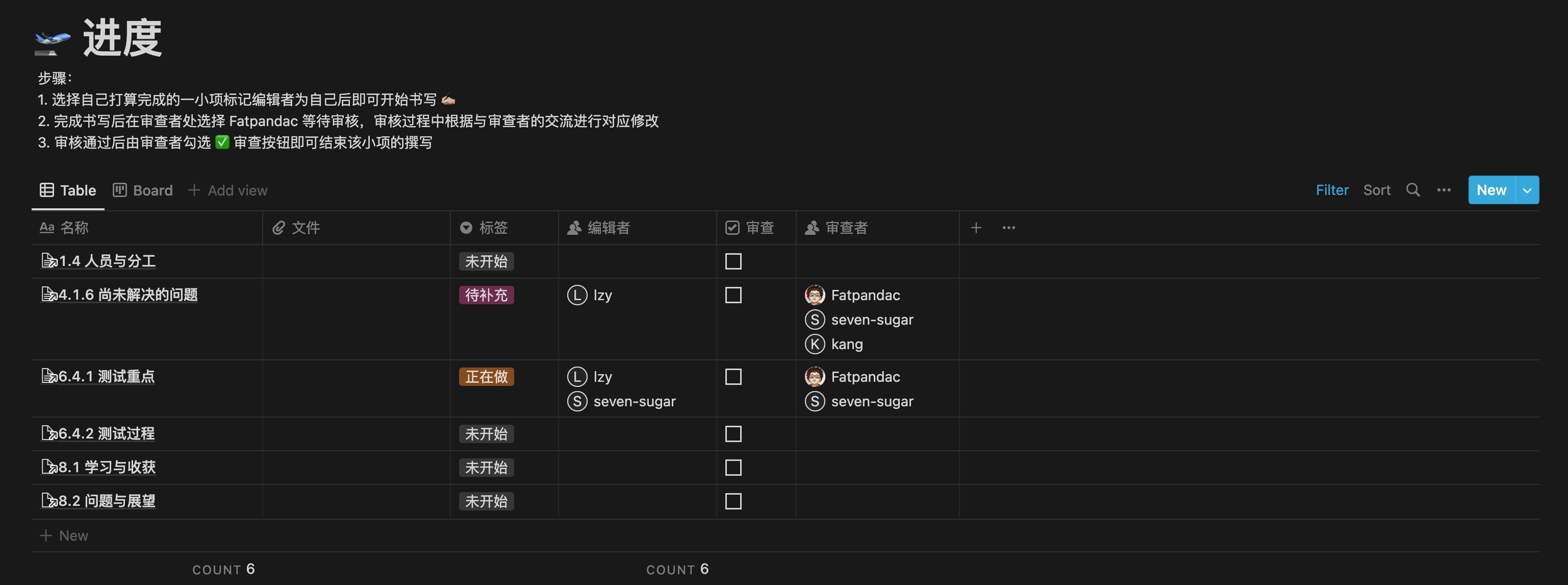
Create a separate page for each small item required in the document. Then, link each page to a table. In addition to the linked files, the table also needs several other data points:
- Files: Used to store image assets and other materials included in the document, which will facilitate future migration of the document.
- Tags: Used to mark the completion status of the item.
- Editor: Used to identify the team member who wrote the item, for subsequent review and feedback.
- Review checkbox: Marks whether the item has been reviewed.
- Reviewer: Specifies the team member responsible for reviewing the item.
This concludes the basic problem-solving solutions in development. If you have any better suggestions, please leave a message ✉️.